On only when you want it.
Weather notifications
In the morning, noon and night, Mimon says a word about the weather. It shows the Japan Meteorological Agency's forecast for the day, with the region name, in a speech bubble. Weather covers places in Japan only.
Weather is off by default. It can be turned on and off separately from Calendar. You can also use it by choosing a region without using location.
The extension's screens are currently in Japanese. Button names below are given in English with the Japanese label that you will see in parentheses.
Two ways to start.
Click Mimon, or open the settings from Chrome's extension icon, and look at the 「天気」 (Weather) section. While it is an egg, open it from the extension icon.
Pick the weather for your location automatically
- Press 「現在地で天気を使う」 (use weather at my current location).
- Read the explanation and choose 「同意して始める」 (agree and start). Location must be available in Chrome and your OS.
- When it shows 「利用中」 (in use) and displays a region name and weather matching your location, setup is done.
Choose a region without using location
- Press 「地域を選ぶ」 (choose a region).
- From the list of places in Japan, select the region whose weather you want and press 「この地域にする」 (use this region).
- When it shows 「利用中」 (in use) together with 「天気の地域」 (weather region) and the forecast, setup is done. From then on it fetches the weather of the region you chose.
While a region is chosen by hand, location is not used. Press 「現在地に戻す」 (return to current location) and confirm the explanation to switch to the current-location method.
You can also see which region it is.
In the settings, 「天気の地域」 (weather region) shows the area the forecast is for. For example 「東京都 / 東京地方」 (Tokyo / Tokyo area) or 「静岡県 / 西部」 (Shizuoka / West) — the prefecture or forecast-area group name followed by the area name.
It also shows whether it is 「現在地から自動判定」 (automatically from your location) or 「手動選択(位置情報は使用しません)」 (chosen manually; location is not used). It is the forecast for the day for the JMA forecast area, not the current weather of a city or town.
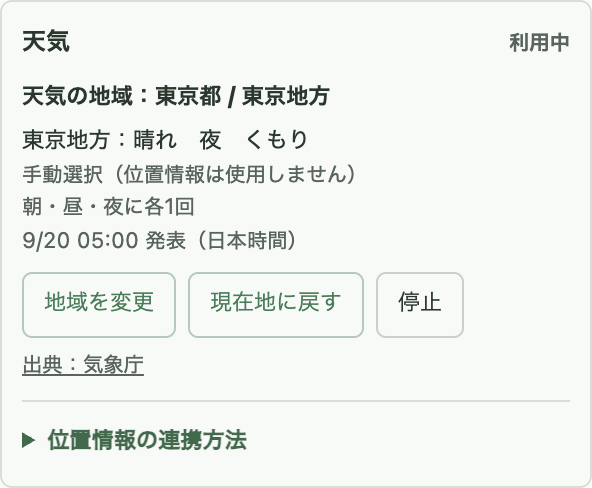
To change the region
- From the current-location method to a region you like: choose with 「地域を選ぶ」.
- To change a region you chose by hand: choose again with 「地域を変更」 (change region).
- From manual selection back to current location: press 「現在地に戻す」, read the explanation and agree. If you cancel, the manually chosen region is kept.
Before a forecast is fetched it shows 「選択地域」 (selected region); for an automatic detection with no valid forecast it shows 「前回取得地域」 (last fetched region); and when no region has been determined yet it shows 「未取得」 (not fetched). Don't rely on the region name alone — check that it shows 「利用中」 and that a forecast is displayed.
At most once each in the morning, noon and night.
- As a guide, in Japan time: morning is 5:00 to before 11:00, noon is 11:00 to before 17:00, and night is 17:00 to before 5:00 the next morning.
- If a tab that can show Mimon is open during that time, it tells you in a speech bubble. It does not speak while it is an egg.
- Time slots during which Chrome was closed are not announced later all at once.
It does not make a separate forecast for each of morning, noon and night; it shows the day's forecast that could be fetched. The notification time and that it will always appear are not guaranteed. Do not use it for urgent weather warnings.
When it won't connect, or when you want to stop it
If it shows 「許可待ち」 (waiting for permission), open 「位置情報の連携方法」 (how to connect location) in the weather section. After checking the location settings of Chrome and your OS, you can retry with 「位置情報を再確認」 (check location again). The permission prompt may not appear in some cases.
If you don't want to use location, or can't get it, use region selection. Pressing 「停止」 (stop) stops fetching weather and also deletes the saved region and forecast. Growth continues as usual.
If it temporarily can't update but a valid previous forecast exists, it shows it with 「前回の内容を表示中」 (showing previous content). Even with the current-location method it does not constantly follow your movement. The fetch interval is, in principle, 3 hours; when there is no valid forecast, a retry happens after at least 30 minutes.
About location and communication
Coordinates obtained with the current-location method are converted into a forecast area on your device. Mimon does not store precise coordinates or movement history, and does not send coordinates to the Japan Meteorological Agency.
Both methods communicate with the Japan Meteorological Agency to fetch the forecast. The current-location method may also involve communication by the location services of Chrome and your OS.
Source: JMA weather forecast (Japan Meteorological Agency; Japanese). Mimon is not an official service of the Japan Meteorological Agency.